
Trade Spend Analysis: A Step-by-Step Method
Maria runs the pet category for a mid-market dry-dog-food brand. It's Tuesday, and she has a recap due Thursday on a $1-off TPR that ran four weeks at Kroger and Albertsons banners. The SPINS extract is open in one tab, the Chewy seller dashboard in another, a finance spreadsheet of deductions in a third. Sales were up 41% during the promo weeks. Her VP wants one number: did it work? Trade spend analysis is the method that turns that spike into a defensible answer. Right now nothing on Maria's three screens tells her, because a sales spike is not a result. This post is the step-by-step method for getting from the one to the other.
If you're new to the broader topic, the trade spend pillar guide covers the vocabulary and the economics. This post assumes you already know what trade spend is and focuses on one thing: how to actually analyze a given event end to end, with a worked example and the calculations to pin each step to.
Key takeaways
- Analysis is the per-event method; analytics is the ongoing system that runs it continuously.
- The steps: set a baseline, isolate incremental units, net out cannibalization, read the result honestly.
- You need promoted and non-promoted POS at SKU/retailer grain, plus the event calendar.
- The most common mistake is counting the whole promo-week spike as incremental.
What trade spend analysis is, and how it differs from trade spend analytics
Trade spend analysis is the investigative work you do to answer a specific question about a specific event: did the $1-off TPR on 30-lb bags at Kroger between weeks 12 and 15 earn back the trade dollars it cost? It has a question, a method, a dataset, and a conclusion. And it ends. Once you've read the result, the analysis is done.
Trade spend analytics is the standing capability that makes that work fast and repeatable: the metric definitions, the baseline model, the reconciled data pipeline, the dashboards. Analytics is the infrastructure; analysis is what you do with it. A team can have excellent analytics and still draw the wrong conclusion from a sloppy analysis, and a team with no analytics at all can still run a rigorous analysis by hand. The two are related but distinct, and conflating them is how teams end up buying a tool and still not getting answers. For the systems-and-metrics side of that pairing, see trade spend analytics; for the standard of proof you should hold an event to, see trade spend effectiveness.
The practical takeaway: this post is about analysis. It's a method for one event, run once. If you find yourself running it forty times a quarter by hand, that's the signal to invest in analytics. For a primer on the discipline overall, what is trade promotions analysis is the introductory read.
The data you need
Before you start, assemble four inputs. Most analyses break not on the math but on a missing or misaligned input here, so it's worth being strict about all four.
- Trade spend by event. Not a quarterly lump sum, but the actual dollars tied to this promotion: scan-down funding, off-invoice allowances, slotting or display fees, any coupon liability. Maria's $1-off TPR at Kroger cost a known per-unit scan-down; she needs that figure, not the brand's annual trade budget.
- Syndicated or retail movement data. Weekly POS (units and dollars by SKU, by retailer) from SPINS, NielsenIQ, or Circana, or pulled from retailer portals (Kroger Stratum, Albertsons, Target POL, Costco IRMA). For pure e-commerce accounts like Chewy, the seller dashboard is your movement source. This is what shoppers actually bought, week by week.
- A baseline. The estimate of what units would have sold without the promotion. This is the input you build rather than pull, and the rest of the analysis hangs off it. More on how below.
- Internal shipments. Your own sell-in to the retailer. Shipments and POS rarely match week to week (retailers buy ahead of a promotion and draw down inventory after it), so treat shipments as a sanity check on whether the trade money was spent on the volume you think it was, not as a substitute for POS.
One join key ties these together: the trade calendar, your record of which promotion ran, where, when, at what depth, and at what cost. If your calendar says four weeks at $1 off and the POS price says the deal showed for three weeks at $0.80 off, the calendar is wrong and the analysis has to use what executed. Reconcile planned against actual before you compute anything.
The trade spend analysis method, step by step
Six steps. Run them in order. Each one produces an output that feeds the next, and skipping a step doesn't save time. It just moves the error downstream where it's harder to catch.
Step 1: Define the question
Write the question down before you open a single file. "Did the promo work?" is not a question you can answer; it has no event boundary and no success bar. "Did the $1-off TPR on the 30-lb bag, weeks 12-15, at Kroger and Albertsons banners, return positive incremental profit after netting trade spend and the post-promo dip?" is. A good question names the SKU, the mechanic, the weeks, the retailers, and the bar. It also tells you what data you need, which is why this step comes first.
Step 2: Assemble and reconcile the data
Pull the four inputs for exactly the scope in your question. Then reconcile. Do the POS weeks line up with the calendar weeks? Does the trade spend figure correspond to the units that actually moved on deal? Does Chewy's reporting calendar match the brick-and-mortar retailer's? Chewy reports on its own fiscal weeks, and a one-week offset against SPINS will quietly contaminate both the baseline and the lift. Resolve every mismatch now. An analysis built on unreconciled data produces a confident, wrong number.
Step 3: Set the baseline
The baseline is what units would have sold with no promotion. The standard approach is the average weekly units in a clean pre-promo window, typically the 8-12 weeks before the deal, adjusted for known distortions: a distribution gain, a price change, a competitor's deep cut, obvious seasonality. For Maria's dog food, demand is fairly flat week to week, so an 8-week trailing average is reasonable. For a seasonal category you would anchor to the prior-year same period instead. Be honest here: a baseline set too low manufactures incremental units that were never incremental, and that single choice flatters the entire result.
Step 4: Isolate incremental units
Incremental units are promo-period units minus baseline units, summed across the promo weeks. If Kroger sold 41,000 units across the four promo weeks and the baseline was 29,000, the gross incremental figure is 12,000. Hold that number: it's gross, not net. It still has two costs buried inside it, and Steps 5 and 6 take them out.
Step 5: Net out trade spend and cannibalization
Three deductions turn gross lift into a real result. First, trade spend: every dollar of scan-down, allowance, and fee tied to the event. Second, the post-promo dip: the weeks after the deal when velocity falls below baseline because loyalists pulled purchases forward. Stop the clock at promo end and you miss this entirely and overstate the result; an 8-week post-window catches most of it. Third, cannibalization: units the promoted 30-lb bag stole from your own 15-lb bag or your other flavors. If the line as a whole didn't grow, the promoted SKU's lift was partly a transfer, not a gain. Subtract all three.
Step 6: Read the result
Now you have net incremental units, net incremental revenue, and incremental profit (net incremental revenue minus incremental cost of goods minus trade spend). The headline metric is trade ROI: incremental profit divided by trade spend. Positive means the event paid back; negative means you bought volume you would mostly have had anyway and paid a discount on top. Read it per retailer, not just rolled up. An event can be strongly positive at one account and underwater at another, and the rolled-up average buries both.
| Step | Output | Calculation |
|---|---|---|
| 1. Define the question | A scoped, answerable question | SKU + mechanic + weeks + retailers + success bar |
| 2. Assemble and reconcile | Four inputs on one calendar | Planned vs executed; align reporting weeks |
| 3. Set the baseline | Expected no-promo units | Trailing 8–12 week average, adjusted |
| 4. Isolate incremental units | Gross lift | Promo units − baseline units |
| 5. Net out costs | Net incremental units | Gross lift − post-promo dip − cannibalization |
| 6. Read the result | Trade ROI | Incremental profit / trade spend |
A worked example: a pet-food brand across Chewy and grocery
Back to Maria. Her $1-off TPR on the 30-lb dry-food bag ran weeks 12-15. She runs the analysis for two channels: Kroger plus Albertsons banners as the grocery line, and a parallel Chewy promotion (a comparable on-site price cut) over the same weeks. The retail price during the deal was $32.99, down from $33.99. Incremental cost of goods is $19.00 per bag, so contribution per incremental unit is $13.99. The post-promo dip is measured over the eight weeks after the deal; cannibalization is the volume the 30-lb bag pulled from the 15-lb bag in the same line.
| Line item | Grocery (Kroger + Albertsons) | Chewy | Total |
|---|---|---|---|
| Promo-period units (weeks 12–15) | 41,000 | 18,500 | 59,500 |
| Baseline units (no-promo estimate) | 29,000 | 14,200 | 43,200 |
| Gross incremental units | 12,000 | 4,300 | 16,300 |
| Post-promo dip (weeks 16–23) | −3,600 | −2,500 | −6,100 |
| Cannibalization of 15-lb bag | −1,900 | −400 | −2,300 |
| Net incremental units | 6,500 | 1,400 | 7,900 |
| Incremental profit (units × $13.99) | $90,935 | $19,586 | $110,521 |
| Trade spend | $59,500 | $31,000 | $90,500 |
| Net result (profit − trade spend) | +$31,435 | −$11,414 | +$20,021 |
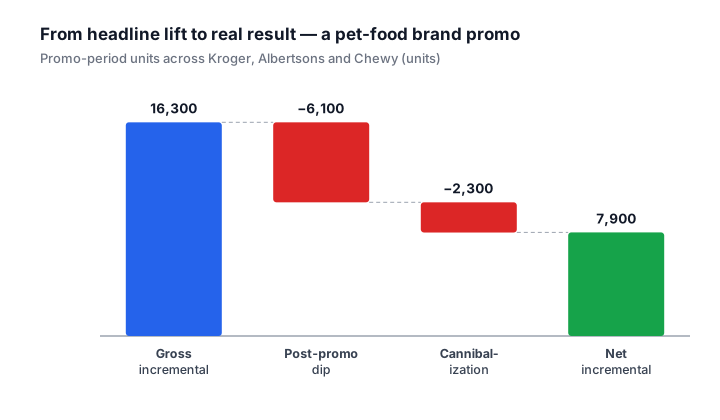
Read the rolled-up line and the event looks fine: +$20,021, trade ROI of about 1.22. Read it per channel and the story changes. Grocery returned +$31,435, a clear, repeatable win. Chewy lost $11,414. The Chewy headline looked great (18,500 units against a 14,200 baseline is a 30% spike) but most of that volume was loyalists buying ahead, which is why the dip was steep relative to the gross lift, and the trade rate Chewy charged was high against the thin net increment that survived. The rolled-up number told Maria to repeat the event. The per-channel read tells her to repeat it at grocery and renegotiate or drop it at Chewy. Same data, two different decisions.
One caveat worth stating: the baseline and the dip are estimates, not measurements. If a competitor ran a counter-promotion during Maria's post-promo window, her Chewy dip would read worse than it truly was. The honest move is to check category movement over the same window before finalizing. If the whole category dipped, part of her dip is the category, not her loyalists.
Common mistakes in trade spend analysis
Three errors account for most analyses that reach a confident wrong answer. Each one is easy to make and easy to avoid once you've named it.
The wrong baseline window
Using the four weeks right before a promotion as your baseline is the most common version. Retailers often run a quiet pre-promo lull, or your own prior event's dip bleeds into that window, so the baseline reads artificially low and every incremental unit after it is inflated. Use a clean 8-12 week window and inspect it for distortions before you trust it. If Maria had baselined Kroger off the four weeks before the TPR, which happened to follow a competitor's deep cut, her 12,000 gross incremental units could easily have read as 16,000.
Ignoring the post-promo dip
Stopping the analysis the day the deal ends feels natural, since the event is over, but it systematically overstates the result. Dog food is a stockpilable, planned purchase; a shopper who buys a 30-lb bag on deal isn't back for six to eight weeks. In the worked example, the dip erased 6,100 units, more than a third of the gross lift. An analysis that skipped weeks 16-23 would have reported the Chewy line as a winner. Always carry an 8-week post-window.
Mixing banner-level pricing into a corporate-parent roll-up
Pricing and promotion decisions live at the banner, not the corporate parent. Safeway and Albertsons both roll up to Albertsons Companies but run their own trade calendars and can deal the same SKU at different depths in the same week. Roll them into one "Albertsons" line and you blend two different promotions into an average that describes neither. Analyze at the banner level, then aggregate up for the summary, never the reverse. The same caution applies to KeHE and UNFI distribution: a SKU moving through both can show very different deal economics by route to market.
Doing this in Scout
Everything above can be done in a spreadsheet for a single event, and for one event a spreadsheet is fine. The method doesn't need software. What software changes is the reconciliation and the repetition: Steps 2 and 3, where most analyst hours actually go.
Scout runs on syndicated retail data (SPINS and similar) and keeps POS, the trade calendar, and event-level spend aligned, so the baseline and the per-banner break-out are computed consistently every time instead of rebuilt by hand. The point isn't a different method. It's the same six steps, run quickly and the same way for every event, so the per-channel read in Maria's table is the default output rather than a Thursday-night spreadsheet exercise. Scout won't make a judgment call on a borderline baseline for you, and the post-promo dip is still an estimate. What it removes is the data prep that crowds out the actual thinking.
Summary and further reading
- Trade spend analysis is the investigative work on one event; trade spend analytics is the standing metrics-and-systems capability that supports it. This post is about the analysis.
- You need four inputs: event-level trade spend, syndicated or retail movement data, a baseline you build, and internal shipments as a sanity check, all joined on a reconciled trade calendar.
- Run six steps in order: define the question, assemble and reconcile, set the baseline, isolate incremental units, net out trade spend and cannibalization, then read the result as trade ROI.
- Read the result per retailer. In the worked example, a +$20,021 rolled-up result hid a +$31,435 grocery win and an -$11,414 Chewy loss: two different decisions.
- Avoid the three recurring mistakes: a baseline window that's too short, dropping the post-promo dip, and rolling banner-level pricing into a corporate-parent average.
From here: trade spend is the pillar guide on the discipline as a whole; trade spend analytics covers the metrics and systems that make this analysis fast; trade spend effectiveness sets the bar for what counts as a result worth repeating; and what is trade promotions analysis is the introductory primer if you want the broader context first.
Frequently asked questions
- What is the difference between trade spend analysis and trade spend analytics?
- Analysis is the method you run on a single event or program: set a baseline, isolate incremental units, net out cannibalization, read the result. Analytics is the ongoing system of metrics and dashboards that does this continuously. See trade spend analytics.
- What data do you need to do it properly?
- Promoted and non-promoted POS or shipment data at the SKU and retailer level, the event calendar (dates, mechanics, planned spend), and sibling-SKU sales so you can catch cannibalization.
- What is the most common mistake?
- Counting the entire promo-week spike as incremental. Without a true baseline and a cannibalization adjustment, analysis routinely overstates ROI.
See this on your own data
Scout gives CPG sales teams the analytics infrastructure they need, without spreadsheets.
Get a 15-min demoGet posts like this in your inbox
Retail data, trade promotion, and category management for CPG teams. Roughly weekly. Unsubscribe any time.