
Inventory Alerts for CPG Brands, in Plain English
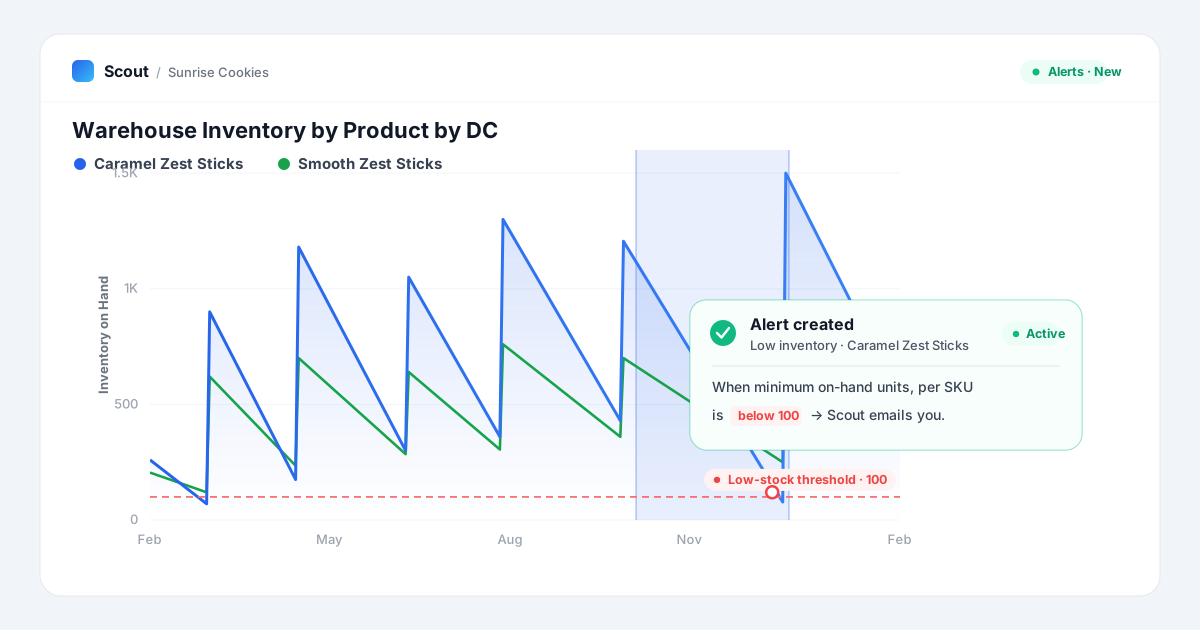
A stockout does not announce itself. Inventory on hand slides toward zero one quiet week at a time, the item stops ringing at the register, and you find out from a retailer scorecard a month later. Inventory alerts flip that around: you name the floor once, and Scout watches the number for you and emails you the week it breaks, per SKU and per warehouse, before the shelf goes empty.
Say your on-hand for one item has crossed below 100 units at a distribution center twice this quarter. Instead of remembering to open the dashboard every Monday, you tell Scout to watch it. From then on, the only time inventory reaches your inbox is the week it actually crosses the line.
This is the new alerting in Scout, and the fastest way to set one is to not fill out a form at all. You draw the low-stock window on the chart, ask in plain English, and Scout writes the alert for you.
What an inventory alert actually watches
An alert is a small, specific rule over one data stream. It has three parts: a measure (the number you care about, like the minimum on-hand units), a condition (the line it should not cross, like below 100), and a grain (what to check it for, like each SKU at each DC). Once a day Scout evaluates the rule against your latest complete week of data and emails you the groups that crossed.
The measure is a single aggregation of one column. "When on-hand drops below" becomes the minimum of on-hand units; "when weekly sales fall under" becomes the sum of net sales. The grain is the "for each" in your ask: for each store, for each item, for each division. Leave it empty and the alert watches one number for the whole stream.
- Low inventory or stockout risk: minimum on-hand units below a floor, per SKU and DC.
- Fill-rate floors: fill rate below 95% on any order or lane.
- Sales drops: weekly net sales for an item falling under a dollar line.
- Out-of-stock spikes: out-of-stock store count climbing above a ceiling.
- Price and distribution moves: average price or stores-selling crossing a line you set.
Set it in plain English
A manual builder is there if you want it, a short form with a live preview of how many groups would fire right now. But the point of the new alerting is that you rarely need it. Ask Scout can read the chart you are already looking at and write the alert for you.
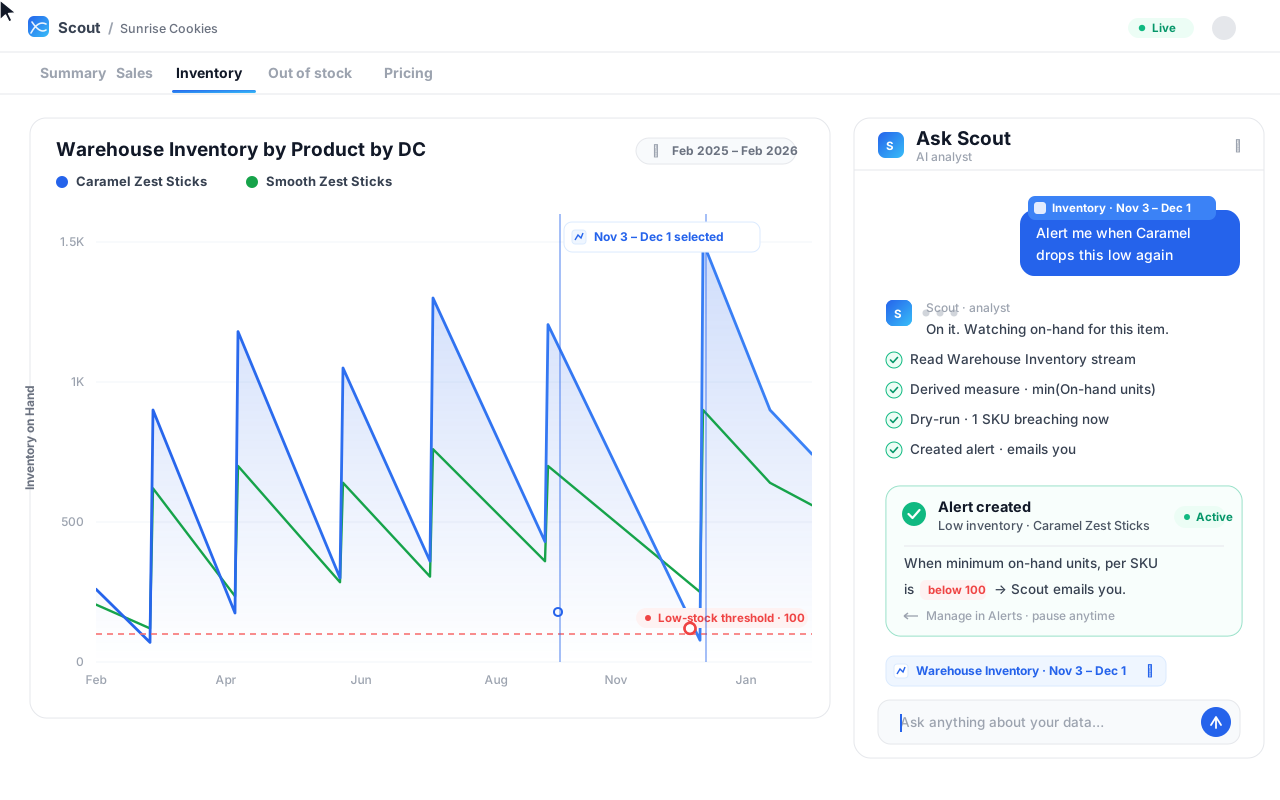
It works because a drag-selection on a chart is real context, not a screenshot. When you highlight a window on the inventory chart, Scout receives the underlying data stream, the measure the chart is plotting, and the exact range you selected. So when you say "alert me when it drops this low again," Scout already knows that "it" is on-hand units for this item, and "this low" is the band you just drew.
From there Scout does the unglamorous part on its own. It confirms the stream can be alerted, translates your ask into a measure and a threshold, runs a dry-run that writes nothing and just counts how many groups breach today, and only then creates the alert. It reads the result back in plain language: what it watches, the exact condition, and who gets the email. If the dry-run had looked wrong, you would have seen it before anything was saved.
Who gets the email
By default, you do. If you do not name anyone, the alert emails whoever created it, so it is never silent and never accidentally broadcast to a list. If you want ops and a broker on it too, name them and they are added. Alerts email; they do not post to a channel or bury the signal in a feed you have to remember to open.
Absolute floors vs relative baselines
There are two kinds of line, and the right one depends on whether your groups are comparable. An absolute threshold is one constant for everyone: on-hand below 100, full stop. It is the right call when the number means the same thing everywhere. A relative baseline judges each group against its own recent history, for example this week running more than 50% above its own trailing-four-week median. Use it when a flat number would be unfair, because a large DC and a small one should not share one line.
| Absolute threshold | Relative baseline | |
|---|---|---|
| The rule | min on-hand below 100 | this week above 1.5x its trailing-4 median |
| Best for | A floor that means the same everywhere | Groups of very different size or seasonality |
| Example | Low-stock and stockout floors | Out-of-stock spikes, demand surges |
| Needs history | No, fires on the first complete week | Yes, several prior weeks per group |
How Scout decides when to fire
The evaluation is deliberately quiet. Once a day Scout pins to your latest complete period, so it never half-alerts on a week that is still loading, and checks every group against the rule. Only groups that cross get an email, and they are batched into one message per alert rather than one per SKU.
The part that keeps it from becoming noise is first-crossing. When a group breaks the line, it fires once. It will not fire again for that same group until it recovers above the line and then crosses back down. So a SKU that sits below its floor for six weeks generates one email, not six. Every email shows the value next to the threshold so the number is legible at a glance, links straight to the event in the app, and carries an Acknowledge button so you can close it out from your inbox.
A worked example
Here is the flow behind the animation above, start to finish. On a Warehouse Inventory by Product by DC chart, one item has been sawtoothing down toward the low-stock line while its sibling SKU holds. You drag-select the trough where it nearly runs out and ask Scout to alert you when it gets that low again.
Scout reads the stream behind the chart, derives the measure as the minimum of on-hand units, and picks a threshold at the floor you highlighted, 100 units. It dry-runs the rule and finds one SKU breaching right now, then creates the alert: when the minimum on-hand units, per SKU, is below 100, email you. It comes back active, and that is the last time you have to think about it until the week it matters.
Three alerts worth setting first
If you are starting from zero, you do not need a wall of alerts. A few well-placed tripwires cover most of the ways inventory hurts you, and each one takes about a sentence to set up. Here is the trio worth standing up first.
A low-stock floor, per SKU and DC
The workhorse. Minimum on-hand units below a floor you know from experience, checked for each SKU at each warehouse. This is the one that catches a distribution center quietly draining before the reorder lands, and it is the alert in the walkthrough above. If you set only one alert this week, set this one, because a stockout you see coming is a reorder and a stockout you miss is lost sales and a nervous buyer.
A fill-rate floor on inbound orders
Fill rate below 95% on any order tells you a retailer is not getting what it ordered, which is the leading indicator of a chargeback conversation and a slot at risk. Set the floor at the level your buyer actually enforces, and let Scout watch every lane so one soft week does not slip past unseen into a scorecard you get handed in the next review.
A demand-surge baseline
A relative alert that fires when a SKU runs well above its own trailing-four-week median. It is the flip side of a stockout: unexpected pull that will empty the shelf if nobody reorders in time. Because it is judged against each item own history rather than a flat number, one line works across a big mover and a slow one at once, without you retuning a threshold for every SKU on the list.
Three alerts, three sentences, and most of the ways inventory quietly costs you are now watched. You can add more later, tuned to your categories and your retailers, but this trio is the difference between finding out on the day it happens and finding out at the end of the quarter.
Where inventory alerts fit
An alert is not a replacement for reading your business; it is a tripwire so you do not have to read it every day to catch the one week that moves. Low on-hand is the earliest, cheapest signal of an on-shelf availability problem, and on-shelf availability is where velocity quietly leaks. If you already track on-shelf availability and sales velocity, an inventory alert is the automation that tells you the moment either is about to break, instead of at the next review.
Scout runs the watch off your own inventory data, per SKU and per DC, and emails you on the first crossing. The result is a shorter distance between a number going wrong and a person doing something about it. See it on your data.
Frequently asked questions
- What is an inventory alert?
- It is a rule that watches your inventory data and emails you when it crosses a line you set, like minimum on-hand units below 100 for any SKU. Scout checks it once a day against your latest complete week and only emails you the SKUs and locations that actually breached, so you find out the week it happens instead of at the next scorecard.
- How does Scout avoid alert spam?
- By only firing on the first crossing. When a group breaks the line it emails you once, and it will not email again for that group until inventory recovers above the line and crosses back down. A SKU stuck below its floor for a month is one email, not thirty, and all breaches from a single check arrive in one message.
- Can I get alerted per store or per DC?
- Yes. The grain is the "for each" in your ask: for each DC, for each SKU, for each store, or any combination present in your data. Leave it off and the alert watches one number for the whole stream; add it and Scout checks the rule separately for every group and tells you exactly which ones crossed.
- Do I have to build the alert myself?
- No. Select the window on a chart and ask Scout in plain English. It reads the chart data source, turns your ask into a measure and a threshold, previews how many groups would fire today, and creates the alert, then tells you in plain language what it watches and who it emails. The manual builder is there if you prefer it, but you rarely need it.
See this on your own data
Scout gives CPG sales teams the analytics infrastructure they need, without spreadsheets.
Get a 15-min demoGet posts like this in your inbox
Retail data, trade promotion, and category management for CPG teams. Roughly weekly. Unsubscribe any time.